
Help Center
Frequently Asked Questions
Find answers to common questions about our properties and services
All questions
NANA HOUSE — House Rules & Guest Guidelines
🕒 Check-in: from 15:00 · 🚪 Check-out: by 11:00 · 🔑 Self check-in/out available
1. Using the Property
👟 No shoes indoors Please remove shoes at the entrance. Shoes are only permitted on the balcony.
🔒 Lock up when sleeping or going out Always lock the door while inside, and whenever you leave.
🚭 Strictly no smoking — anywhere Smoking is prohibited indoors, on balconies, and directly outside the entrance. ⚠️ Penalty if violated: ¥50,000
👥 Registered guests only Only guests listed in the booking may stay. The number of guests must match the reservation exactly. ⚠️ Undeclared extra guests: ¥5,000 per person
🍳 Kitchen use — provided utensils only Cooking is welcome. Please use only the kitchen utensils provided. Open flames (candles, etc.) are not permitted.
👕 No hanging laundry on curtains, lamps, or the AC unit
🔇 Quiet hours: 9:00 PM – 7:00 AM Please keep noise to a minimum out of respect for our neighbors.
🐾 Pets — not allowed Pets are not permitted at any Nana House property.
📺 Turn off appliances when going out Please switch off the AC, TV, and lights before leaving. Lock all doors and windows.
🛏️ Towels are not replaced during your stay Bath towels are provided at check-in. If they get dirty, please wash them yourself.
🚽 Toilet etiquette Please sit when using the toilet. Only flush toilet paper — nothing else. Always flush after use.
🛋️ Do not rearrange furniture or fixtures Please do not move or alter any furniture, appliances, or fixtures without permission.
🧹 Garbage separation Please separate trash into: burnable, non-burnable, and recyclables (cans/bottles/PET bottles). Place in the kitchen bins on the 1st floor. For bulky items (suitcases, strollers), please take them with you — disposal fees apply if left behind.
2. Penalty Fees
Violation | Fee |
|---|---|
🚭 Smoking inside the property | ¥50,000 |
📶 Loss of Wi-Fi router | ¥100,000 |
🛋️ Damage to furniture / appliances | Cost of replacement |
🤢 Soiling of bedding due to vomiting | ¥50,000 (flat fee) |
👥 Undeclared extra guests | ¥5,000 per person |
3. Prohibited Items
- 🐶 Pets or animals
- 🔥 Flammable or explosive materials
- 🤢 Items with strong odors
- 💊 Items prohibited by law
4. Prohibited Activities
- Smoking anywhere on or around the property
- Commercial photography or videography without permission
- Sales, advertising, or solicitation without permission
- Gambling or behavior that disturbs neighbors
- Loud noise, shouting, or disruptive conduct in or around the property
5. Important Notes
- 🗺️ Please check the evacuation route map posted inside and locate emergency exits when you arrive.
- 🏠 The property is for accommodation only — no business use without prior approval.
- 👶 Minors must have guardian consent to stay overnight.
- ⚖️ Long-term stays do not create any legal rights of residence.
- NANA HOUSE reserves the right to terminate a stay immediately in cases of serious rule violations.
🙏 Thank you for helping us keep NANA HOUSE a wonderful home for everyone. Questions? Reach us via WhatsApp, Zalo, LINE, or Facebook Messenger.
Garbage Disposal Guide for Long-Term Guests (Nerima, Tokyo)
Living in Tokyo for weeks or months means following Japan's strict garbage separation rules every week. This guide gives you the exact collection schedule for your specific Nana House location in Nerima City.
All schedules are based on the official Nerima City garbage collection calendar. Please place garbage at the collection point before 8:00 AM on the designated day.
🏠 Nana House Nerima
- 🔥 Burnable Garbage(燃えるゴミ)→ Monday & Thursday
- ♻️ Plastic Containers & Packaging(プラスチック)→ Wednesday
- 🍶 Bottles / Cans / PET Bottles(びん・缶・ペットボトル)→ Friday
- 🚫 Non-burnable Garbage(燃えないゴミ)→ 2nd & 4th Tuesday of the month
- 📦 Cardboard & Paper(古紙)→ Neighborhood recycling area (contact staff)
🏠Nana House Sakaecho
- 🔥 Burnable Garbage(燃えるゴミ)→ Tuesday & Friday
- ♻️ Plastic Containers & Packaging(プラスチック)→ Monday
- 🍶 Bottles / Cans / PET Bottles(びん・缶・ペットボトル)→ Thursday
- 🚫 Non-burnable Garbage(燃えないゴミ)→ 2nd & 4th Saturday of the month
- 📦 Cardboard & Paper(古紙)→ Neighborhood recycling area
🏠 Nana House Ekoda (Asahigaoka)
- 🔥 Burnable Garbage(燃えるゴミ)→ Monday & Thursday
- ♻️ Plastic Containers & Packaging(プラスチック)→ Tuesday
- 🍶 Bottles / Cans / PET Bottles(びん・缶・ペットボトル)→ Friday
- 🚫 Non-burnable Garbage(燃えないゴミ)→ 1st & 3rd Wednesday of the month
- 📦 Cardboard & Paper(古紙)→ Neighborhood recycling area
🏠 Sengawa House (Toyotamakami)
- 🔥 Burnable Garbage(燃えるゴミ)→ Wednesday & Saturday
- ♻️ Plastic Containers & Packaging(プラスチック)→ Tuesday
- 🍶 Bottles / Cans / PET Bottles(びん・缶・ペットボトル)→ Saturday
- 🚫 Non-burnable Garbage(燃えないゴミ)→ 1st & 3rd Monday of the month
- 📦 Cardboard & Paper(古紙)→ Neighborhood recycling area
📋 What Goes in Each Category?
- 🔥 Burnable(燃えるゴミ): Food waste, paper scraps, small wood, rubber, leather, used diapers, kitchen waste
- ♻️ Plastic(プラスチック): Food trays, plastic bags, bottles, packaging with プ mark — rinse clean before disposing
- 🍶 Bottles / Cans / PET(びん・缶・ペット): Glass bottles, aluminum & steel cans, PET bottles — empty and rinse, remove caps
- 🚫 Non-burnable(燃えないゴミ): Small metal items, ceramics, glass (non-bottle), umbrellas, light bulbs — collected only twice a month
- 📦 Cardboard & Paper(古紙): Flatten cardboard boxes, tie with string. Newspapers, magazines, flyers — take to the neighborhood recycling area
🛑 Large Garbage(粗大ゴミ)
- Items larger than 30cm (furniture, bicycles, appliances) cannot go in regular garbage — they require a paid large garbage collection service (粗大ゴミ収集)
- To request collection: call Nerima City at 03-3993-1111 or apply online at the Nerima City website (nerima.tokyo.jp)
- Please consult with staff before disposing of large items
✅ House Rules for Garbage Disposal
- ✔ Always separate garbage correctly — incorrect disposal can result in the garbage not being collected
- ✔ Place garbage at the designated collection point before 8:00 AM on collection day
- ✔ Do NOT put out garbage the night before — morning only
- ✔ Rinse food containers before recycling — dirty items go in burnable
- ✔ Do NOT leave garbage in the hallway, entrance, or common areas of the house
- ✔ If you miss collection day, keep the garbage in your room until the next collection
📱 Useful App: Gomisuke (Garbage Assistant)
- Gomisuke (ゴミすけ) is a free Japanese app that tells you exactly what type of garbage to put out on any given day, based on your address
- Available on iOS App Store and Google Play Store — search "ゴミすけ" or "Gomisuke"
- Set your address to the Nana House or Sengawa House location to get push notification reminders the night before each collection day
How to Book a Room on TokyoTravel.jp — Step-by-Step Guide
Booking a furnished apartment in Tokyo doesn’t need to be complicated. TokyoTravel.jp keeps the process simple and entirely online — no Japanese required, no guarantor, no key money. Here’s exactly how to do it.
Step 1: Browse Available Properties
Go to tokyotravel.jp/room to see all available properties. You’ll currently find seven options across the Ekoda and Nerima areas of Tokyo, ranging from a cozy 1LDK for solo travelers or couples to 3-bedroom houses sleeping up to 9 guests.
Each listing shows the number of bedrooms, guest capacity, floor area, and pricing — either per night or per month depending on the property. Take a moment to compare based on your group size and intended length of stay.
Current properties include:
∙ Nana House Sakaecho — 3 bedrooms, up to 9 guests, ¥25,000/night (3 min walk to Ekoda Station, 2 stops to Harry Potter Studio)
∙ Nana House Ekoda — 3 bedrooms, up to 8 guests, 51㎡ (8 min walk to Ekoda Station)
∙ Nana House Nerima — 2 bedrooms, up to 6 guests, 41㎡, ¥12,000/night (near Nerima Station, 1 stop to Harry Potter Studio)
∙ 1LDK House Ekoda — 1 bedroom, up to 2 guests, ¥150,000/month
∙ Tokiwadai House — 2 bedrooms, up to 2 guests, ¥180,000/month
∙ Nana House Ekoda Monthly — 3LDK, up to 4 guests, ¥300,000/month
∙ Hasu House — 3 bedrooms, up to 6 guests, ¥100,000/month
Step 2: Check the Calendar
Before clicking Book Now, head to tokyotravel.jp/calendar to check availability for your preferred dates. This saves time and helps you avoid selecting a property that’s already taken for your window.
Step 3: Click “Book Now” on Your Chosen Property
On the room listing page, each property has a BOOK NOW button. Click it to start the reservation process. You’ll be prompted to enter your check-in and check-out dates, guest count, and contact details.
Step 4: Send an Inquiry or Confirm Directly
If you have questions before committing — about a specific room layout, amenities, or whether the property suits your needs — use the Contact form at tokyotravel.jp/#contact. You can also reach the team directly via WhatsApp or Zalo using the QR codes shown on the website. The team responds in English.
Step 5: Receive Booking Confirmation
Once your booking is confirmed, you’ll receive detailed check-in instructions including the self-check-in lockbox code. No need to coordinate arrival times — you can arrive at any hour.
After confirmation, the team will also share contact details for your stay via Facebook Messenger, WhatsApp, LINE, or WeChat — whichever you prefer.
Step 6: Arrive and Self Check-In
All Nana House properties use a secure lockbox system for self check-in. Your access code is provided with your confirmation. Walk up, enter the code, and you’re home.
What You Do NOT Need to Book
One of the biggest advantages of booking directly through TokyoTravel.jp versus traditional Japanese rental agencies:
∙ ❌ No key money (礼金)
∙ ❌ No Japanese guarantor
∙ ❌ No Japanese bank account
∙ ❌ No agency fee
∙ ❌ No Japanese language required
Frequently Asked Questions
Can I book for just one night?
Yes — Nana House Sakaecho and Nana House Nerima offer nightly rates. Other properties are available on a monthly basis.
Are pets allowed?
Pets are not permitted at any Nana House property.
Is parking available?
Sakaecho House offers one free parking space. Other houses don’t have parking, but there are paid public parking options nearby. All properties are within walking distance of train stations, so a car is usually not needed.
What’s included in the price?
All properties come fully furnished with high-speed Wi-Fi, a fully stocked kitchen, AC, washing machine, bedding, and toiletries. Confirm utility billing details at time of booking.
How do I contact the host during my stay?
After booking confirmation, the host shares contact info via Facebook Messenger, WhatsApp, LINE, or WeChat. For emergencies, see the FAQ at tokyotravel.jp/faq.
Ready to book your Tokyo home? Browse all available properties at tokyotravel.jp/room.
Recommendations for Guests Staying at Nana House
🏠 Nana House Sakaecho & Ekoda
🛒 Supermarkets
Big-A · 1 min walk (60m) Affordable drinks, milk, and meat. Great bread selection. 📍 Google Maps
Maruman Store · 4 min walk (260m) Good quality vegetables and meat at low prices. 📍 Google Maps
🏪 Convenience Store
FamilyMart · 1 min walk (40m) 📍 Google Maps
💊 Drug Store
Sugi Drug Store · 1 min walk (30m) Medicine, daily necessities, and toiletries. 📍 Google Maps
🍽️ Restaurants
Ganryu · 3 min walk (190m) · 💴 ¥7,000–10,000/person High-end yakiniku. Staff grills for you at the table. Book in advance on Tabelog and choose a course. 📍 Tabelog · Google Maps
NIKUZO Ekoda · 4 min walk (290m) Korean-style BBQ. Cheap and tasty lunch set. Dinner is a bit pricier. 📍 Google Maps
Yakiniku House · 3 min walk (220m) · 💴 ~¥10,000/person Mainly wagyu beef. A bit on the expensive side for a full meal. 📍 Google Maps
YAKITORI Torikizoku · 3 min walk (190m) · 💴 ~¥2,000/person Grilled skewers. Cheap, tasty, and great for a casual night out. 📍 Google Maps
Wasabi (魚 わさび) · 3 min walk (240m) Specialises in fresh sushi and sashimi. 📍 Google Maps
Ekoda Aburiya · 2 min walk (160m) · 💴 ¥3,000–5,000/person Seafood restaurant with great sashimi at reasonable prices. Set meals available. 📍 Google Maps
Ramen Taiyō · 4 min walk (260m) Long-established ramen shop since 1976. Tasty, cheap, and full of character. 📍 Google Maps
Sichuan Restaurant Kyo Ki · 4 min walk (300m) Chinese food with a wide variety of dishes. Cheap lunch sets available. 📍 Google Maps
Matsuya Ekoda · 2 min walk (110m) · 💴 ¥600–800/meal The very first Matsuya in Japan, opened in 1968. Now with 1,300+ locations nationwide. Incredibly cheap set meals. 📍 Google Maps
Sukiya · 6 min walk (400m) Cheap and filling rice bowl (gyudon) sets. 📍 Google Maps
Shabuyo · 12 min walk (850m) All-you-can-eat shabu-shabu hotpot. Great variety of food, self-service vegetable bar, and dessert corner. Recommended: 牛三筋 & Spanish pork. You can also order sushi on the side. 📍 Google Maps
Dontei · 14 min walk Sukiyaki in a more refined atmosphere. Food is served directly to your table. 📍 Google Maps
🛍️ Shopping
Uniqlo · 1 station away 📍 Google Maps
🏠 Nana House Nerima
🛒 Supermarkets
OK Supermarket · 350m Good quality meat and a wide variety of fresh produce. 📍 Google Maps
Big-A · 300m Cheap drinks and milk. Many options available. 📍 Google Maps
🏪 Convenience Stores
7-Eleven · 220m 📍 Google Maps
Lawson · 170m 📍 Google Maps
🅿️ Coin Parking
Coin parking available · 90m 📍 Google Maps
🍽️ Restaurants
Yaki-niku Gyushige · 950m · 💴 ¥4,000–5,000/person Delicious and affordable. Skip the all-you-can-eat (quality isn't as good) — order à la carte instead. If you drink a lot, go for the all-you-can-drink option. Very spacious, no reservation needed. 📍 Google Maps
Gyu-Kaku Nerima Tasty meat, slightly more expensive than Gyushige. 📍 Google Maps
Shabuyo · 1km All-you-can-eat shabu-shabu hotpot with vegetable bar and dessert corner. Recommended: 牛三筋 & Spanish pork. Sushi available as a side order. 📍 Google Maps
Ootoya Delicious home-style Japanese meals at a fair price. Must-try: もろみチキン (Moromi Chicken). Order with multigrain rice if possible. Food is cooked fresh so it may take a little longer — worth the wait. 📍 Google Maps
Choshimaru (Sushi) · Toyotamaminami 📍 Google Maps
🛍️ Shopping & Other
Uniqlo · 1km 📍 Google Maps
Hot Spring (銭湯) 🛁 📍 Google Maps
Have a wonderful stay and enjoy exploring the neighborhood! 🍜
Check-In & Check-Out Guide
Check-In & Check-Out Guide
Welcome to Nana House! Here is everything you need to know about arriving and leaving smoothly.
🕒 Check-In & Check-Out Times
Time | |
|---|---|
✅ Check-in | From 15:00 |
🚪 Check-out | By 11:00 |
Self check-in and self check-out are available — no need to wait for a host.
🔑 How to Check In
- Before arrival, you will receive a message from the host with the door lock code via your booking platform (Airbnb / Booking.com) or via WhatsApp / LINE / Zalo.
- Go to the key lockbox located at the entrance of the property.
- Enter the code to open the lockbox and retrieve the door key.
- Use the key to unlock the front door and enter.
- Please keep the key safe throughout your stay. Lost keys will be charged at cost.
💡 If you have not received your check-in code by the day of arrival, please contact the host immediately via your booking platform or WhatsApp.
🧳 Check-Out Procedure
Please follow these steps before leaving:
- Collect all your belongings — check all rooms, the bathroom, and the kitchen.
- Take out your trash — please separate garbage according to the Garbage Separation Guide and place bags in the correct outdoor bin.
- Wash and return dishes — please clean any dishes, pots, or utensils you used and return them to their original place.
- Turn off all appliances — air conditioner, TV, lights, and fans in all rooms.
- Close and lock all windows before leaving.
- Return the key to the lockbox and scramble the code.
- Lock the front door to make sure it is fully closed.
⏰ Early Check-In / Late Check-Out
Early check-in and late check-out may be available depending on availability.
- Please contact the host at least 24 hours in advance to request.
- Early check-in and late check-out may be subject to an additional fee.
- We will do our best to accommodate your request, but cannot guarantee availability.
🚖 Getting to Nana House
Nana House Nerima
📍 2-7-4 Toyotama-Naka, Nerima-ku, Tokyo 🚉 Nearest station: Nerima Station (approx. 14 min walk) 🚌 Direct bus access to Shinjuku and Ikebukuro available nearby.
From Narita Airport: Take the Narita Express (N'EX) to Ikebukuro Station → transfer to the Seibu Ikebukuro Line → get off at Nerima Station. Total approx. 90–100 min.
From Haneda Airport: Take the Keikyu Line to Shinagawa → transfer to the Yamanote Line to Ikebukuro → Seibu Ikebukuro Line to Nerima Station. Total approx. 60–70 min.
Nana House Ekoda & Nana House Sakaecho
📍 2-35-7 Asahigaoka, Nerima-ku, Tokyo (Ekoda)🚉 Nearest station: Ekoda Station (approx. 8 min walk)
📍 28-3 Sakaecho, Nerima-ku, Tokyo (Sakaecho) 🚉 Nearest station: Ekoda Station (approx. 3 min walk)
From Narita Airport: Take the Narita Express (N'EX) to Ikebukuro Station → transfer to the Seibu Ikebukuro Line → get off at Ekoda Station. Total approx. 85–95 min.
From Haneda Airport: Take the Keikyu Line to Shinagawa → Yamanote Line to Ikebukuro → Seibu Ikebukuro Line to Ekoda Station. Total approx. 55–65 min.
💡 Tip: Purchase an IC card (Suica or Pasmo) at the airport for easy train and bus travel throughout Tokyo.
🔑 Check-in & House Rules
👉 NANA HOUSE Basic Rules Self check-in with lockbox. No smoking (¥50,000 penalty). Max guests as booked. Shoes off indoors. Quiet after 9:00 PM.
👉 Nana House Ekoda – Noise Rules Keep quiet after 9 PM. Carry suitcases (don't roll). Close car doors quietly.
📖 Getting Started
👉 How to Book – Step-by-Step Guide How to book a room on TokyoTravel.jp.
👉 Frequently Asked Questions (FAQ) Location, access, amenities, parking, occupancy (max 7 guests), contact methods.
🏠 Using the House
👉 How to use the Air Conditioner Guides for DAIKIN, HITACHI, and PANASONIC remotes. Recommended: 26–28°C (cooling) / 20–22°C (heating).
👉 How to use the Washing Machine Separate guides for Nana House Sakaecho, Ekoda, and Nerima machines.
👉 How to use the Toilet (TOTO) Bidet, flush, dryer, and temperature controls explained.
🗑️ Garbage
👉 Garbage Separation Guide Burnable (yellow bag), non-burnable (blue bag), recyclables. Preferred days: Tuesday & Friday. If bin is full → move to outdoor bin & message host.
🍜 Around the Neighborhood
👉 Recommendations – Supermarkets, Restaurants & Shops Nearby supermarkets (Big-A, Maruman), convenience stores, restaurants by category for Sakaecho, Ekoda, and Nerima.
🆘 Emergency
👉 Emergency Service & Evacuation Guide 🚑 Ambulance/Fire: 119 | 🚓 Police: 110 Nearest evacuation shelters listed per property. Host: 090-8270-2329.
Emergency Service
🆘 Emergency Contact Information
For urgent help during your stay, please contact the numbers below immediately.
🚑 Medical Emergency / Ambulance
Dial: 119
Say: "Ambulance, please."
You can say: "Someone is sick/injured."
🚒 Fire
Dial: 119
Say: "Fire, please."
You can say: "There is a fire."
🚓 Police
Dial: 110
Say: "Police, please."
You can say: "There is an emergency." or "I need help."
🏠 Your Address (for emergency use):
Nana House Nerima
📍 [Nerima-ku, toyotamanaka 2-7-4]
📞 Host contact: [090-8270-2329]
Nana House Ekoda
📍[Nerima-ku, asahigaoka 2-35-7]
📞 Host contact:[090-8270-2329]
🗣 Helpful Japanese Phrases
"Kyuukyuu desu. (Emergency!)"
"Netsu ga arimasu. (I have a fever.)"
"Kemuri desu. (There is smoke.)"
"Jiko desu. (There’s an accident.)"
🧭 How to Communicate
Speak slowly.
If possible, use a translation app.
Stay calm and give your location clearly.
🏠 Emergency Evacuation Guide (Earthquake) – Nerima City, Tokyo
📍 Property Address 1:(Nana House Nerima)
2-7-4 Toyotama-Naka, Nerima-ku, Tokyo
Nearest Evacuation Shelter:
Toyotama Elementary School
📍 4-2-20 Toyotama-Naka, Nerima-ku, Tokyo
🏫 Type: Public Elementary School
Alternative Shelter:
Toyotama Daini Elementary School
📍 2-16-1 Toyotama-Kami, Nerima-ku, Tokyo
🏫 Type: Public Elementary School
📍 Property Address 2:(Nana House Ekoda)
2-35-7 Asahigaoka, Nerima-ku, Tokyo
Nearest Evacuation Shelter:
Asahigaoka Elementary School
📍 2-21-1 Asahigaoka, Nerima-ku, Tokyo
🏫 Type: Public Elementary School
Alternative Shelter:
Kotake Elementary School
📍 2-6-7 Kotake-cho, Nerima-ku, Tokyo
🏫 Type: Public Elementary School
🚨 What to Do in Case of an Earthquake
Stay Calm: Protect yourself from falling objects by taking cover under sturdy furniture.
Evacuate if Necessary: If the building is unsafe, evacuate to the nearest open area or designated evacuation shelter.
Bring Essentials: Take your passport, wallet, mobile phone, and any necessary medications.
Follow Official Instructions: Listen to local authorities and follow their guidance.
Garbage Separation Guide
🗑️ Garbage Separation Guide (Tokyo)
Please help us keep the neighborhood clean by following the local garbage rules.
🟡 1. Burnable Garbage (燃えるゴミ / Combustibles)
Examples:
Food waste
Tissues and paper towels
Small wood items
Leather or rubber products
🛍️ How to dispose:
Use designated yellow bags or clear plastic bags.
Tie the bag tightly.
🔵 2. Non-Burnable Garbage (燃えないゴミ / Non-Combustibles)
Examples:
Glass and ceramics
Metal items
Small electronics
Batteries (remove from devices)
🛍️ How to dispose:
Use designated blue bags or clear plastic bags.
Wrap sharp items for safety.
♻️ 3. Recyclables (資源ゴミ / Resources)
Separate into the following categories:
Cans & Bottles – Rinse before throwing away
PET Bottles – Remove cap and label, rinse
Glass Bottles – Rinse
Paper – Newspapers, magazines, cardboard (tie with string)
📦 How to dispose:
Use designated collection area or boxes
Don’t mix with regular trash
🔴 4. Oversized Garbage (粗大ごみ / Bulky Waste)
Requires advance reservation!
If you have any large items to throw away (e.g. suitcases, furniture, electronics):
➡️ Please contact the host in advance.
Bulky items cannot be disposed of like regular garbage and require special handling.
🧹 When the Garbage Bin is Full
🏠 Nana House Nerima
If the indoor garbage bin is full:
➡️ Please move the trash bag to the back entrance area.
📩 After placing the bag, please send us a message.
📆 If possible, we appreciate it if you can do this onTuesdays and Fridays.
🏠 Nana House Ekoda
If the indoor garbage bin is full:
➡️ Please move the trash bag to the large outdoor garbage bin in the garden.
📩 After placing the bag,please send us a message.
📆 If possible, we appreciate it if you can do this on Tuesdays and Fridays.
🏠 Nana House Sakaecho
If the indoor garbage bin is full:
➡️ Please move the trash bag to the large outdoor garbage bin beside the house.
📩 After placing the bag,please send us a message.
📆 If possible, we appreciate it if you can do this on Tuesdays and Fridays.
Kitchen & Cooking Guide
🍳 Kitchen Equipment Available
The following items are provided at all properties:
Cookware
- Pots (various sizes)
- Frying pan
- Cutting board
- Kitchen knives
Utensils
- Chopsticks, forks, spoons, knives
- Ladles and spatulas
- Bowls, plates, cups, glasses
Appliances
- Gas stove (2 burners + fish grill tray in the center)
- Microwave oven
- Rice cooker
- Kettle
Other
- Dish soap and sponge
- Kitchen paper towels
- Salt and basic seasonings (may vary by property)
🔥 How to Use the Gas Stove
The kitchen is equipped with a 2-burner gas stove with a fish grill tray in the center.
To use the burners:
- Place your pot or pan on the burner.
- Turn the knob and press and hold it for 1–2 seconds to ignite — you will hear a click and see the flame appear.
- Turn the knob to adjust the flame size (lower = smaller flame).
- To turn off, rotate the knob back to the off position until it clicks.
To use the fish grill (魚焼きグリル):
- Pull out the grill tray and place food on the rack.
- Turn the grill knob and hold to ignite.
- Monitor closely — the grill heats quickly.
- Turn off completely when done and allow to cool before removing the tray.
⚠️ Safety reminders:
- Never leave the flame unattended.
- Make sure the flame is fully off when you finish cooking.
- Keep flammable materials (paper, cloth, plastic bags) away from the stove.
- Ensure the kitchen is well-ventilated while cooking — open a window if possible.
🍚 How to Use the Rice Cooker
- Measure rice using the provided cup (1 cup = approximately 1–2 servings).
- Rinse the rice with cold water 2–3 times until water runs clear.
- Add water to the corresponding line marked inside the inner pot.
- Place the inner pot inside the rice cooker and close the lid.
- Press 炊飯 (Cook) to start. Cooking takes approximately 30–40 minutes.
- When done, the rice cooker will switch to 保温 (Keep Warm) mode automatically.
🧹 Kitchen Rules
- Please wash all dishes after use and return them to their original place.
- Do not leave food or dirty dishes in the sink overnight.
- Please wipe down the cooktop and counters after cooking.
- Do not use open flame (candles, portable gas stoves, etc.) inside the property.
- Please dispose of food waste in the burnable garbage bin and follow the Garbage Separation Guide.
🛒 Where to Buy Groceries Nearby
Nana House Nerima
- Big-A — 300m (5 min walk) — cheap drinks, milk, snacks
- OK Supermarket — 350m — good quality meat and fresh produce
- 7-Eleven — 220m (3 min walk)
- Lawson — 170m (2 min walk)
Nana House Ekoda & Sakaecho
- Big-A — 1 min walk — cheap drinks, milk, bread
- MARUMAN STORE — 4 min walk — good vegetables and meat
- FamilyMart — 1 min walk (40m)
💡 Japanese convenience stores (7-Eleven, Lawson, FamilyMart) stock ready-to-eat meals, fresh sandwiches, snacks, and basic cooking items — open 24 hours.
Nana House Ekoda rule
ハウスルール / House Rules(騒音防止のお願い)
近隣の皆様への配慮にご協力ください
Please help us respect our neighbors.
① 夜間の静粛について
21:00以降はお静かにお過ごしください。
Please keep noise to a minimum after 9:00 PM.
・大きな声での会話はお控えください
Please avoid loud conversations
・電話やオンライン通話は小さな声でお願いします
Please speak quietly during calls
② キャリーケースについて
キャリーケースは持ち上げて運んでください。
Please carry your suitcase instead of rolling it.
・床や道路で引きずると大きな音が出ます
Rolling suitcases may cause loud noise on the ground
③ 車両の利用について
夜間の車のドア開閉は静かに行ってください。
Please close car doors quietly, especially at night.
・タクシーの乗降時もご配慮ください
Please be mindful when using taxis
④ 出入りについて
夜遅い時間の出入りはできるだけお控えください。
Please avoid going in and out late at night when possible.
⑤ その他
・近隣のご迷惑となる行為は禁止されています
Any behavior that disturbs neighbors is prohibited
・ルール違反の場合、宿泊をお断りする場合がございます
Violation of these rules may result in termination of your stay
🙏 ご理解とご協力をお願いいたします
Thank you for your understanding and cooperation.
How to use Washing Machine
Nana House Sakaecho
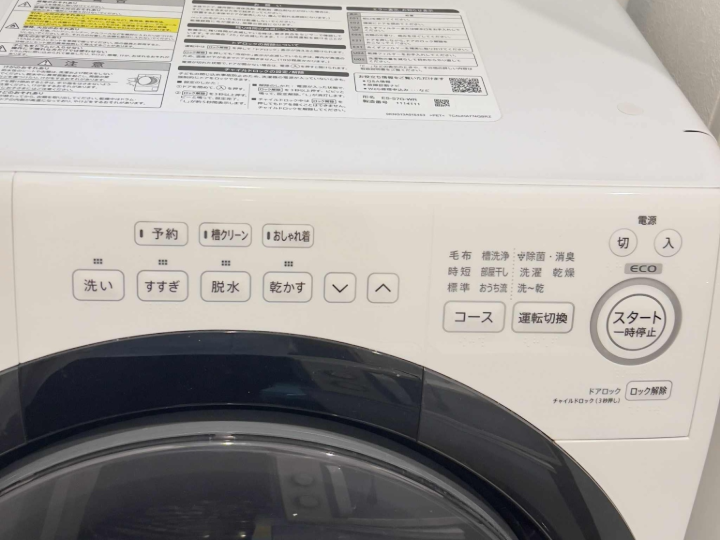
🔘 Main Buttons
電源 (でんげん / Power) → Power On/Off
スタート / 一時停止 (Start / Pause) → Start or Pause operation
コース (Course) → Select washing course
運転切換 (うんてんきりかえ / Operation Switch) → Switch between wash, rinse, spin, dry
ECO → Eco mode (energy-saving)
⏺ Function Buttons
予約 (よやく / Reservation) → Timer (delayed start)
槽クリーン (そうクリーン / Tub Clean) → Drum/Tub cleaning mode
おしゃれ着 (おしゃれぎ / Delicate Clothes) → Gentle wash for delicate fabrics
⏺ Wash Options
洗い (あらい / Wash) → Washing
すすぎ (すすぎ / Rinse) → Rinsing
脱水 (だっすい / Spin) → Spinning
乾かす (かわかす / Dry) → Drying
↑ / ↓ → Adjust settings (time, level, etc.)
⏺ Wash Courses (右側文字列)
毛布 (もうふ / Blanket) → Blanket mode
槽洗浄 (そうせんじょう / Tub Clean) → Tub self-clean
冷風乾燥 (れいふうかんそう / Cool Air Dry) → Cool air drying
消臭 (しょうしゅう / Deodorize) → Deodorizing
時短 (じたん / Time-Saving) → Quick wash
標準 (ひょうじゅん / Standard) → Standard course
洗濯~乾燥 (せんたく~かんそう / Wash & Dry) → Full course (wash → rinse → spin → dry)
標準 乾燥 (ひょうじゅん かんそう / Standard Dry) → Normal drying only
おうち流 (おうちりゅう / Home-style) → Custom wash
洗~乾 (せん~かん / Wash → Dry) → Auto wash and dry
🔐 Other
ロック解除 (ろっくかいじょ / Unlock) → Unlock child lock / door lock
✅ Basic Use Example
Press 電源 (Power).
Choose コース (Course) (e.g., Standard).
Adjust with ↑ / ↓ if needed.
Press スタート (Start) to begin.
Nana House Ekoda
🔘 Main Buttons
電源 (でんげん / Power) → Power On/Off
スタート / 一時停止 (Start / Pause) → Start or Pause washing
コース (Course/Program) → Select washing program
⏺ Wash Programs
標準 (ひょうじゅん / Standard) → Standard wash
おいそぎ (お急ぎ / Quick) → Quick wash
つけおき (Soak) → Soak mode
毛布 (もうふ / Blanket) → Blanket mode
ソフト (Soft / Gentle) → Gentle wash for delicate clothes
槽洗浄 (そうせんじょう / Tub Clean) → Drum/Tub cleaning
⏺ Functions
洗い (あらい / Wash) → Washing
すすぎ (すすぎ / Rinse) → Rinsing
脱水 (だっすい / Spin) → Spinning only
予約 (よやく / Reservation) → Timer (set delayed start)
✅ Quick Use
Press 電源 (Power).
Choose a コース (Course) (e.g., Standard).
Adjust options if needed.
Press スタート (Start).
Nana House Nerima
🔘 Main Buttons
電源 (Power) → Power On/Off (nút này ở phía góc, ảnh chụp thiếu)
スタート / 一時停止 (Start / Pause) → Start / Pause
⏺ Function Buttons (hàng dưới cùng từ trái qua phải)
ゼロバフズム (Zero System / Eco mode) → Energy-saving
温水ミスト (おんすいミスト / Warm Water Mist) → Warm mist wash
お湯取 (おゆとり / Water Reuse) → Reuse water from previous cycle
水量 (すいりょう / Water Level) → Adjust water level
洗い (あらい / Wash) → Washing
すすぎ (すすぎ / Rinse) → Rinsing
脱水 (だっすい / Spin) → Spin-dry only
乾燥 (かんそう / Dry) → Dry only
洗濯 (せんたく / Wash only) → Washing only
洗・乾 (せん・かん / Wash & Dry) → Full course (wash → rinse → spin → dry)
予約 (よやく / Reservation) → Timer (delayed start)
✅ Quick Use
Press 電源 (Power).
Select 洗濯 (Wash), 乾燥 (Dry), or 洗・乾 (Wash & Dry).
Adjust 水量 (Water Level) or other options if needed.
Press スタート (Start).
Toilet

🚽How to Use the TOTO Toilet CES9151/NW1
(TOTO ウォシュレット一体型便器 ZJ1シリーズ)
🔹Main Features / 主な機能
Heated seat(暖房便座)
Bidet with rear & front wash(おしり・ビデ洗浄)
Warm air dryer(温風乾燥)
Deodorizer(脱臭)
Remote control operation(リモコン操作)
🧻1. Washing Functions / 洗浄機能
🪑Sit on the seatto activate the system.(便座に座るとセンサーが作動します)
➤ Rear Wash(おしり)
Pressおしりfor rear cleansing.
➡️ Button: 「おしり」
➤ Front Wash(ビデ)
Pressビデfor feminine wash.
➡️ Button: 「ビデ」
➤ Oscillating Spray(ムーブ)
Moves nozzle back and forth.
➡️ Button: 「ムーブ」
➤ Water Pressure(水勢)
Adjust with強 (Strong)/弱 (Weak)buttons.
➡️ Buttons: 「水勢 強」 / 「水勢 弱」
➤ Stop(停止)
Ends any function.
➡️ Button: 「止」
🌬️2. Dryer Function / 温風乾燥
Press乾燥to activate warm air dryer.
➡️ Button: 「乾燥」
AdjustDryer Temperaturewith 温風強 / 弱 if available.
🌡️3. Temperature Settings / 温度調節
➤ Seat Temperature(便座温度)
➡️ Button: 「便座温度」
➤ Water Temperature(洗浄水温度)
➡️ Button: 「洗浄水温度」
➤ Dryer Temperature(温風温度)
➡️ Button: 「温風温度」
🧼4. Cleaning / お手入れ
The nozzle cleans automatically.(ノズルは自動で洗浄されます)
For manual cleaning, pressノズルそうじ
➡️ Button: 「ノズルそうじ」
Clean the toilet with a soft cloth. Avoid chemicals.
🚰Flushing / 流す
Flush Type | English Name | Japanese Button Label |
|---|---|---|
Large Flush | For solids | 大 |
Small Flush | For liquids | 小 |
Stop Flush | Cancel flush | 止 |
🚨 Flush buttons on a wall remote .
⚠️5. Safety Tips / 注意事項
🚫 Do not stand on the toilet seat or lid.(便座やフタの上に立たないでください)
🚫 Do not splash water on the remote.(リモコンに水をかけないでください)
✅ Children should use under adult supervision.(お子様の使用時は大人が同伴してください)
How to use the Air conditioner
DAIKIN

1. Power On/Off
- 停止 (Yellow Button): Press to turn off the air conditioner.
- 自動 (Green Button): Press to turn on in Auto Mode.
2. Select Operation Mode
- 冷房 (Cooling Mode) – Blue Button
- ドライ (Dry/Dehumidify Mode) – Light Blue Button
- 暖房 (Heating Mode) – Red Button
- 送風 (Fan Only Mode) – Gray Button
3. Recommended Temperatures
- Summer (Cooling Mode):
🔵Recommended: 26°C–28°C for energy efficiency and comfort. - Winter (Heating Mode):
🔴Recommended: 20°C–22°C for a warm and energy-saving environment.
4. Adjust Temperature
- Use the up/down arrows next to the 温度 (Temperature) symbol.
- Display shows current setting in Celsius (°C).
5. Fan Speed (風量)
- Adjusts airflow: Low, Medium, High, or Auto.
6. Air Direction (Swing Settings)
- Vertical Swing (上下): Controls up/down airflow.
- Horizontal Swing (左右): Controls left/right airflow.
7. Timer (タイマー)
- 入 (ON Timer): Set time for air conditioner to start.
- 切 (OFF Timer): Set time for it to turn off.
- 取消 (Cancel): Cancels timer settings.
8. Other Useful Functions
- ストリーマ (Streamer): Activates air purification.
- クリーン (Clean): Self-cleaning mode.
- セーブ (Save): Energy-saving mode.
- 内部分 (Indoor Fan): Circulates air without heating or cooling.
HITACHI

1. Power On/Off
- 停止 (Stop) – Gray button: Turns off the air conditioner.
- Select a mode (below) to turn it on.
2. Operation Modes
- 🔴暖房 (Heating) – Red button
- 🟢除湿 (Dehumidify) – Green button
- 🔵冷房 (Cooling) – Blue button
- ⚪送風 (Fan) – Gray button next to 停止
3. Temperature Control
- Use the Up (▲) and Down (▼) arrows next to 室温 (Room Temperature) to adjust the temperature.
✅Recommended Settings:
- Summer (Cooling Mode): 26–28°C
- Winter (Heating Mode): 20–22°C
4. Fan Speed and Air Direction
- 風速 (Fan Speed) – Top right button: Adjust the airflow speed.
- 風向 (Air Direction/Swing) – Bottom right button: Adjust the direction of airflow.
5. Timer Settings
- 切タイマー (Off Timer) – Top left button: Set time to turn off the air conditioner.
- 入タイマー (On Timer) – Bottom left button: Set time to turn on the air conditioner.
PANASONIC

1. Power On/Off
🔴停止 (Stop)– Red-bordered button in the center:
Press toturn offthe air conditioner.Toturn on, press one of the following mode buttons:
2. Operation Modes
🔵冷房 (Cooling)– Light blue button
🔶暖房 (Heating)– Orange button
🟢除湿 (Dehumidify)– Green button
⚪自動 (Auto)– Gray button
3. Temperature Adjustment
Use the上下 (Up/Down)buttons under 温度 (Temperature) to change the temperature setting.
✅Recommended Settings:Summer (Cooling): 26–28°C
Winter (Heating): 20–22°C
4. Fan and Air Direction
風量 (Fan Speed)– Adjusts airflow speed
風向 (Air Direction)– Adjusts the direction of the airflow
5. Timer
切タイマー (Off Timer)– Bottom left: Set the time to turn off automatically
本体リセット (Unit Reset)– Bottom center: Resets the settings
Frequently Asked Questions (FAQ)
Q1: Where are your properties located?
Our homes are situated in Nerima and Ekoda, both vibrant residential areas in Tokyo.The Nerima property is a 14-minute walk from Nerima Station, while the Ekoda property is an 8-minute walk from Ekoda Station.
Q2: How far is the nearest train station?
Nerima Property:Approximately 14 minutes by walk to Nerima Station.
Ekoda Property:About 8 minutes on foot to Ekoda Station.
Q3: Are the properties easily accessible from major attractions?
Yes! Both locations offer convenient access to popular destinations:
Shinjuku & Ikebukuro:Accessible via direct bus routes from both properties.
Disney Resort:Approximately 1 hour by train and bus.
Harry Potter Studio Tour:Easily reachable by public transportation.
Q4: What amenities are available at the properties?
Both homes are fully equipped with:
High-speed Wi-Fi
Fully stocked kitchens
Air conditioning and heating
Washing machines
Comfortable bedding and toiletries
Spacious living areas
Q5: What is the maximum occupancy?
Each property accommodates up to 7 guests comfortably.
Q6: Is there parking available?
Public parking is available nearby.Please note that parking fees may apply.
Q7: Are the properties family-friendly?
Absolutely!Both homes are suitable for families, with amenities like cribs and baby car available upon request.
Q8: Are pets allowed?
Pets are not permitted in our properties to ensure a comfortable environment for all guests.
Q9: How do I check in?
Self-check-in is available with a secure lockbox system.Detailed instructions will be provided upon booking confirmation.
Q10: Is smoking allowed?
Our properties are non-smoking.Designated smoking areas are available nearby.
Q11: What dining options are nearby?
Both locations offer a variety of dining options within walking distance:
Gyu-Shige (Yakiniku BBQ):Known for premium meats at great value.
Shabu-Yo (Shabu-Shabu):All-you-can-eat hot pot experience.
Local eateries:Numerous restaurants offering Japanese and international cuisines.
Q12: How can I contact you during my stay?
For your convenience, you can reach us through various channels:
Airbnb App:For booking-related inquiries and support.
Booking.com App:If you booked through Booking.com, please use their messaging system.
After confirming your booking, we'll share our contact details via:
Facebook Messenger
WeChat
LINE
WhatsApp
Feel free to reach out through any of these platforms for assistance during your stay.
Still have questions?
We usually reply within 24 hours, in English.
Optional Services
Add extra services to enhance your stay
Zai Baily
Payment for rent fee
$1,529 / per time · ¥240,000¥240,000 / per time · ≈ $1,529